Breeding
Rank mates and pairings
Use the Breeding plan to rank mates for one animal, or pairs across your animals, with carrier risk, an inbreeding limit, and the reasons shown.
Client Pro Checked against the app on
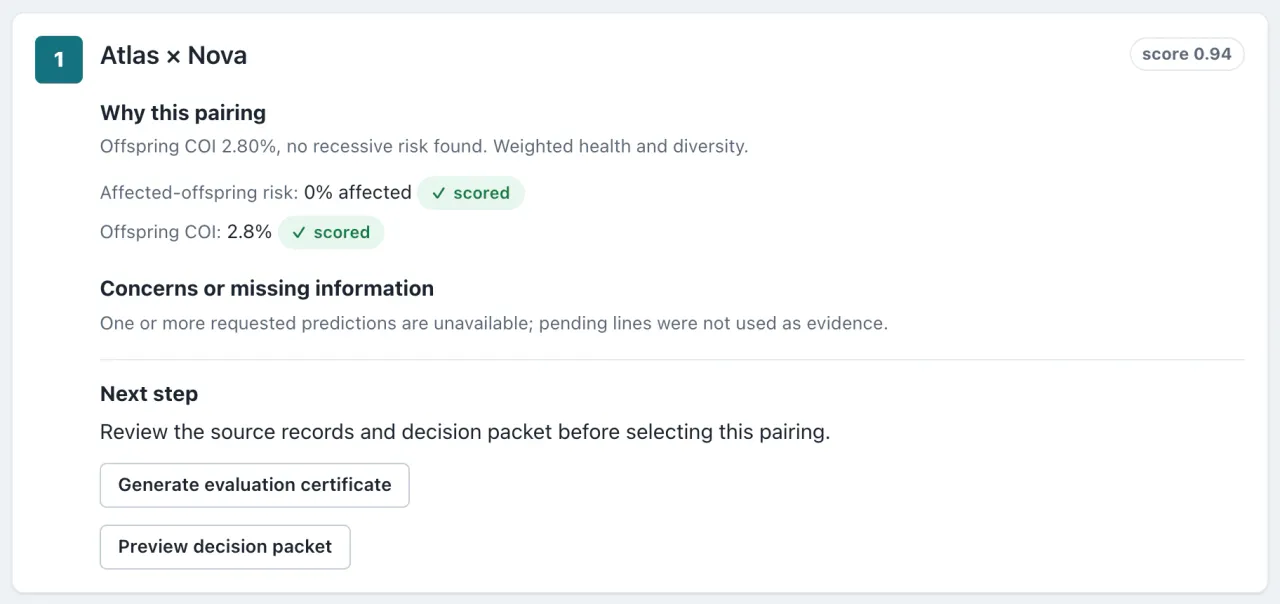
The Breeding plan ranks candidates against a goal you set, and shows why each one ranks where it does.
Set up a ranking
- Select Breeding plan in the top bar.
- Under What are you planning?, choose Find a mate for one animal or Find the best pair in my program.
- Set your limits: species and breed, Max offspring COI %, and Avoid at-risk pairings. That last one is on by default, and it leaves out any pair with a chance of affected offspring for a condition both animals were tested for.
- If you want, add Candidate must-haves, such as an age range, a registered animal, or an animal listed as available.
- Under Rank the eligible options, choose what matters most: Reduce known genetic health risk or Preserve genetic diversity.
- Select Find current matches for one animal, or Rank pairings for your program.
Read the ranking
- Each result shows Why this match or Why this pairing, then Concerns or missing information, and a Next step.
- When the records can’t tell candidates apart, AnimalTrace lists them as eligible and says they aren’t ranked yet, instead of inventing an order.
- Offspring inbreeding only counts ancestors on record. For animals you added yourself, whose parents aren’t on record, it usually reads 0%, which doesn’t mean the pair is unrelated. See check a pairing.
- Candidates can include other owners’ animals only when those owners have opted in to network discovery and you are allowed to see their records.
Keep a plan current
In program mode, select Keep watching to save your criteria. A watch can flag a changed animal in the candidate pool after a supported update. Open the plan under Saved plans and run a fresh comparison before relying on a pairing.
Still stuck? Contact us and a person will reply within 2 business days.